MCP Resource Proxying and MCP Apps Support
DeployStack satellites now proxy MCP Resources and preserve `_meta` metadata, so MCP Apps like Excalidraw's interactive canvas work through DeployStack out of the box.
What Changed
MCP servers don't just expose tools — many also expose Resources. Resources are URIs like ui://excalidraw/mcp-app.html that provide data, files, or interactive UIs to connected clients. Some MCP servers (like Excalidraw) use resources to power MCP Apps — interactive experiences that show up directly in your AI client.
Until now, DeployStack's satellite returned an empty list when a client asked for resources. That meant any MCP server relying on resources simply didn't work through DeployStack. MCP Apps showed up blank.
That's fixed now. The satellite discovers, caches, and proxies resources just like it does with tools.
What's New
Resource Discovery and Proxying
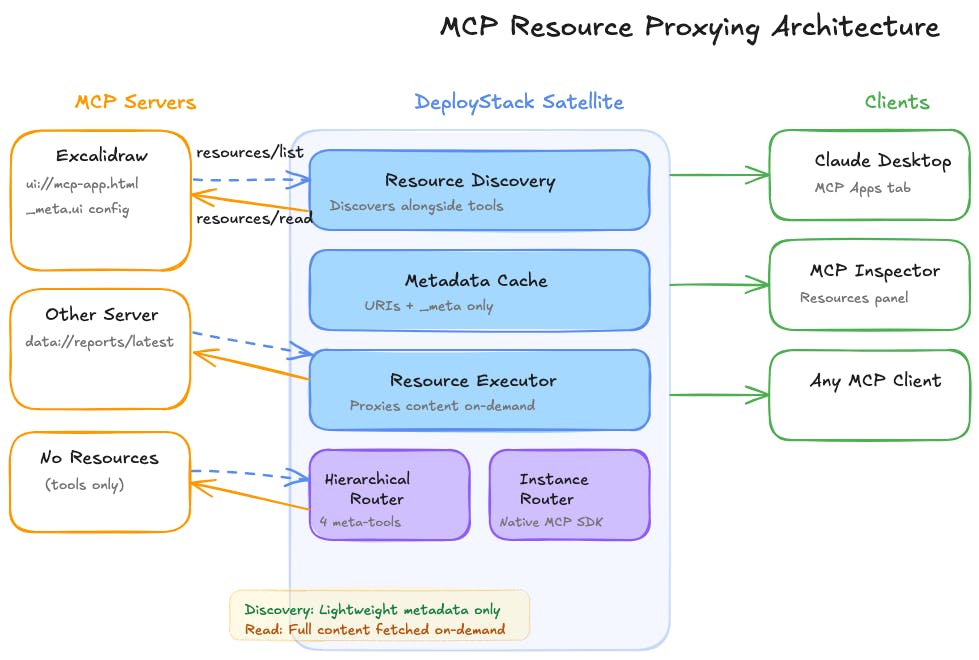
When the satellite discovers an MCP server's tools, it now also discovers its resources in the same connection. Resource metadata (URIs, names, descriptions, MIME types) is cached for fast lookups. When a client actually requests a resource's content via resources/read, the satellite proxies that request to the MCP server in real-time — content is never cached, so you always get the latest version.
Resource templates are also supported. If an MCP server advertises parameterized resource URIs, those templates are passed through to clients as well.
MCP Apps Work Through DeployStack
MCP Apps rely on a meta field in tool and resource listings. This metadata tells the client things like "this tool has an interactive UI at this resource URI." Previously, the satellite stripped meta during its caching process, so MCP Apps appeared empty even when tools and resources were technically available.
Now, meta is preserved through the entire chain — from the MCP server's response, through discovery caching, through the unified manager, all the way to the client's tools/list and resources/list responses. The hierarchical router also rewrites resource URIs inside meta to use the correct namespaced format, so everything resolves correctly.
Two New Meta-Tools
The hierarchical router (used when multiple MCP servers share a single endpoint) now exposes 4 meta-tools instead of 2:
- discover_mcp_tools — find tools across your installed servers (existing)
- execute_mcp_tool — run a specific tool (existing)
- list_mcp_resources — browse resources from all your installed servers (new)
- read_mcp_resource — fetch a resource's content by its namespaced URI (new)
Native MCP Protocol Support
Both the hierarchical router and the instance router now register proper MCP SDK handlers for resources/list, resources/read, and resources/templates/list. MCP clients that use the native resource protocol (instead of meta-tools) get full resource support automatically.
How It Works
- Discovery — When the satellite connects to an MCP server (STDIO subprocess or HTTP/SSE remote), it sends resources/list and resources/templates/list right after tool discovery. If a server doesn't support resources? No problem. It silently returns nothing — no errors, no disruption to the rest of the discovery flow.
- Caching — Resource metadata is stored in the UnifiedResourceDiscoveryManager. This manager shares the same server availability map as the tool discovery system, so if a server goes offline, its resources disappear from listings automatically.
- Proxying — When a client calls resources/read, the McpResourceExecutor figures out which MCP server owns that resource and routes the request there. STDIO servers get a 60-second timeout. HTTP/SSE servers get a temporary MCP SDK client with OAuth credentials injected when needed. Content comes back directly — no intermediate caching.
- URI Namespacing — The hierarchical router prefixes resource URIs with the server slug using a pipe separator (e.g., excalidraw|ui://excalidraw/mcp-app.html). Instance router? It just uses the original URIs as-is, since each endpoint only serves one server anyway.
What You Don't Need to Do
Nothing. If you're already running MCP servers through DeployStack, resource support is automatic. Servers that expose resources will have them available to your clients. Servers that don't expose resources continue to work exactly as before.